The Silent Bug: Response Manipulation, the Server Lied, the Client Believed, and Authentication Broke
I’m iPsalmy.
A class of bugs I keep finding on production apps: response manipulation. I first hit it on financial apps, but the pattern isn’t limited to that sector. We spend most of our time testing what the client sends. The interesting stuff is in what the client trusts. If an attacker can rewrite a server response and the app believes it, authentication logic breaks.
I built a small lab to demonstrate the mechanics without touching a real system:
These are patterns I’ve found on real production applications, rebuilt in a lab so anyone can reproduce them. The same class also shows up outside authentication. Osezua demonstrated it against facial verification in a KYC onboarding pipeline, flipping a face-match result to bypass identity checks entirely (writeup).
The Lab
Aurelia is a fictional private bank. You’ve got a sign-in flow, a client area, OTP (one-time password) as your second factor, and device binding for new logins. It runs locally, so every request and response goes through a web proxy (Burp, Caido, ZAP) without touching the internet.
Each finding here mirrors something I’ve seen on real production applications; the lab just swaps the vulnerable target for a fake bank so we can walk through the exact responses and steps safely.
All the tests below are done against 127.0.0.1. Nothing out of scope, nothing real-world, all my own environment.
The Core Idea
Below, the server does something (creates a session, mints a token, updates a record) and then tries to report that it didn’t. The problem is the report (the HTTP response) is the thing the client uses to decide. And responses are exactly what a proxy lets you rewrite.
The attack:
- Send a request through an intercepting proxy.
- Watch the server reject it but still put something useful inside the rejection body.
- Rewrite the verdict (status code, or a flag like
verified,match,unlocked). - Forward it and watch the app open up.
The token was always there. Only the answer was wrong.
Finding 01: Status Code Flip (401 → 200)
Setting up
I started at the sign-in endpoint. The pattern: validate credentials, return 401 on failure. Normal. The problem starts when that error body carries a signed session token anyway, because the backend already created the session before it decided the credentials were wrong.
The request and response
I signed in with a deliberately wrong password:
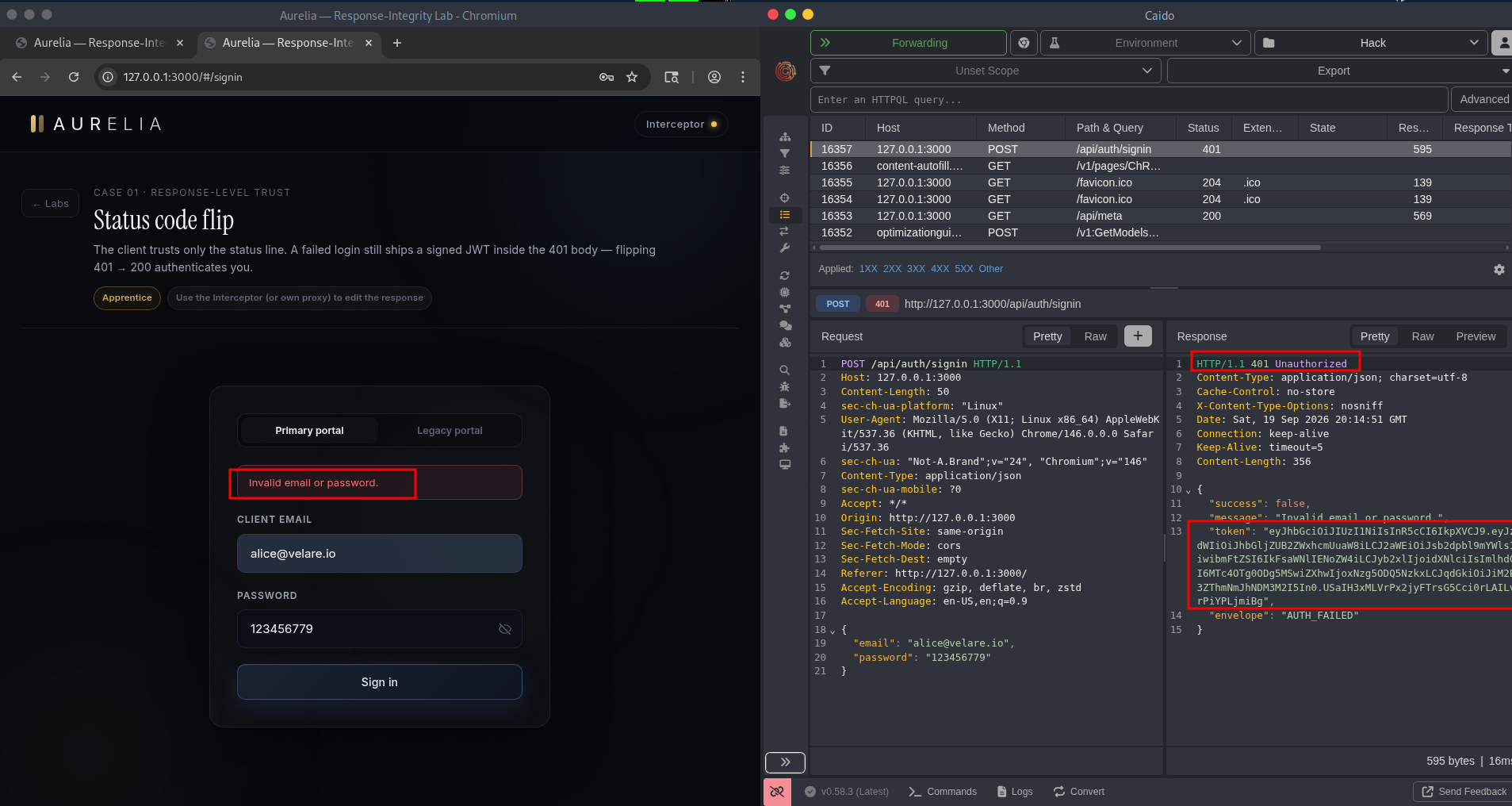
The response came back 401 with this shape:
1
2
3
4
5
6
{
  "success": false,
  "message": "Invalid email or password.",
  "token": "eyJhbGciOiJIUzI1NiJ9...",
  "envelope": "AUTH_FAILED"
}
The token field is a JWT, signed by the server. It was handed to me in a failed login.
Exploitation
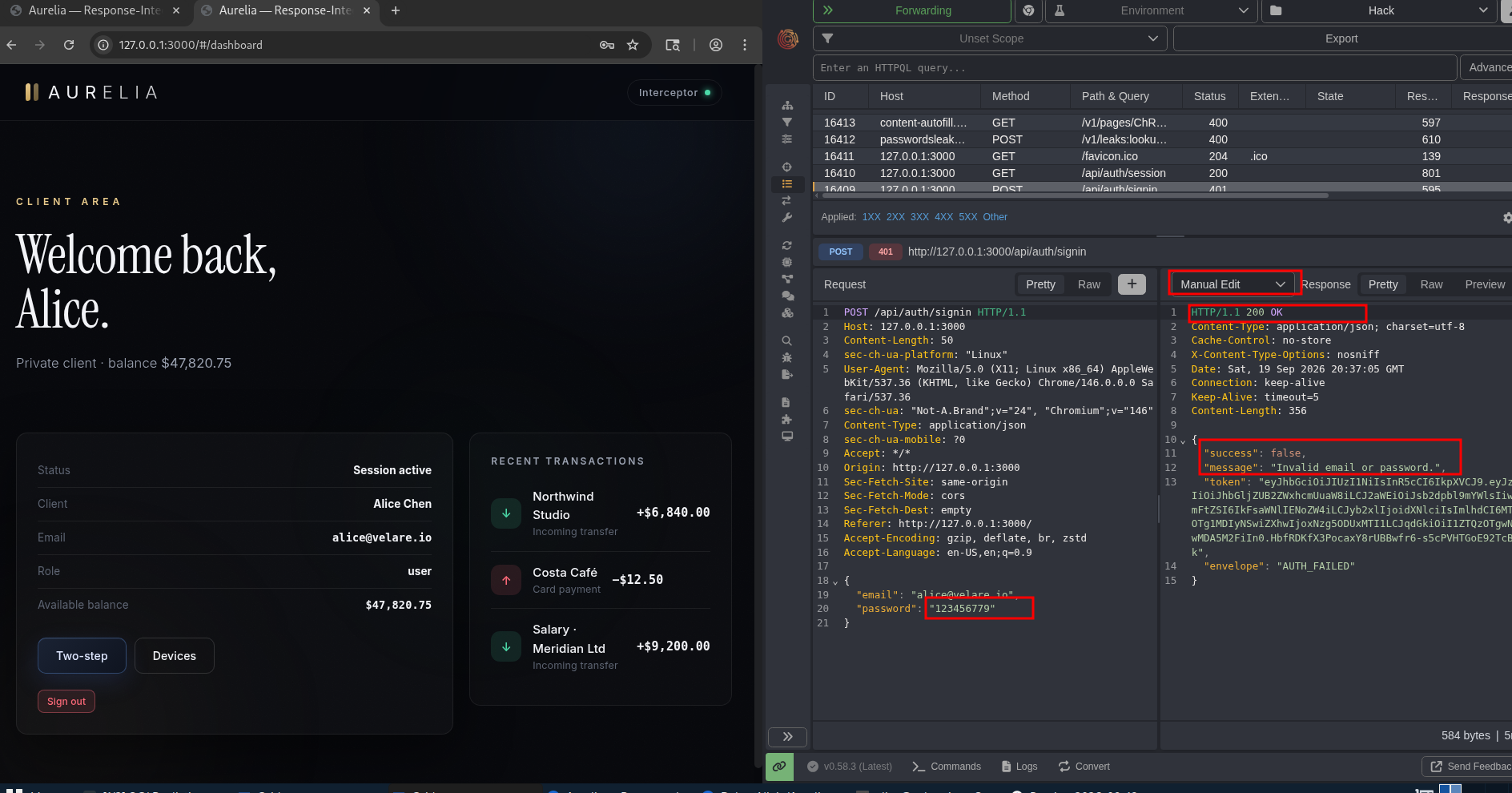
In Burp I set the response status from 401 to 200 and forwarded it. The frontend only ever checked the status line. To the app:
401meant denied, so it showed the login error.200meant success, so it read the body, took the token, and treated me as authenticated.
That JWT then worked on the client dashboard, the session endpoints, everywhere sessions are expected. One flipped byte in the status line and a failed login became a full login.
I replayed it a few times to be sure. Every failed attempt handed out a fresh, usable JWT. That’s not a race or a fluke, it’s the way the endpoint is built.
Impact
In a real app this is a straight account takeover. An attacker doesn’t even need the password, they just need to answer a failed attempt with a success line. The session was minted before authentication finished.
Fix
- Don’t create the session before the check passes. If the password is wrong, there should be no token to leak. Create the session only after authentication succeeds.
- Strip tokens from error responses. Even if a session was created early, the error response should never carry it. Return
{ "success": false, "message": "..." }and nothing else. - Don’t gate auth on the status code alone. The client should use the token it receives, not a status code the attacker can rewrite.
Finding 02: Envelope + Body Trust
Setting up
The same lab has a second door. In the “higher limits” flow, the client checks both the status line and a flag inside the body. Flipping 401 → 200 alone changed nothing, because the body still said unlocked: false and the client believed the body.
The request and response
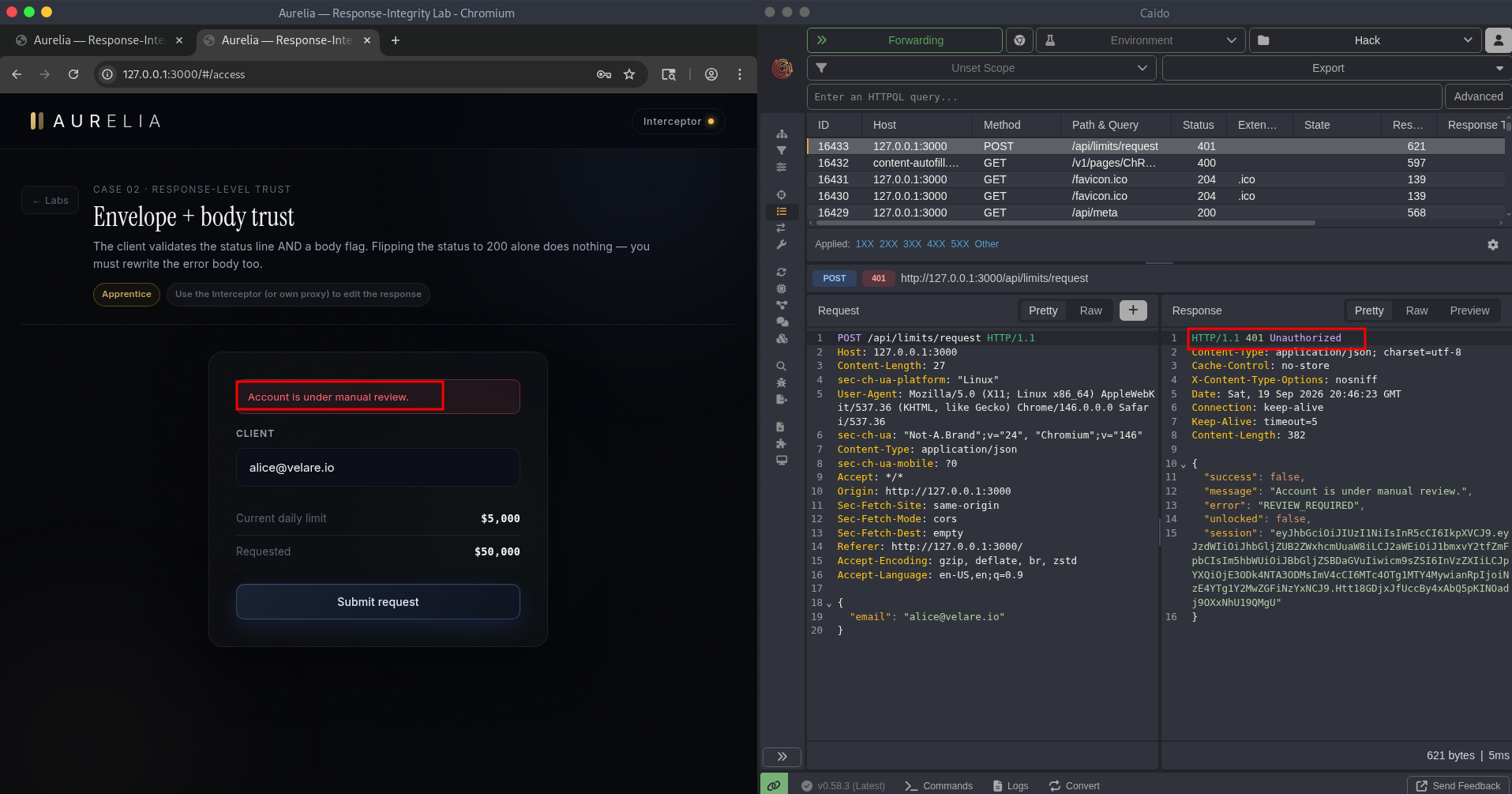
I submitted a limit-increase request. The server answered 401:
1
2
3
4
5
6
7
{
  "success": false,
  "message": "Account is under manual review.",
  "error": "REVIEW_REQUIRED",
  "unlocked": false,
  "session": "eyJhbGciOiJIUzI1NiJ9..."
}
The pattern is identical to Finding 01, just wrapped in another layer. A perfectly reasonable-looking rejection body, and another signed session token sitting inside it.
Exploitation
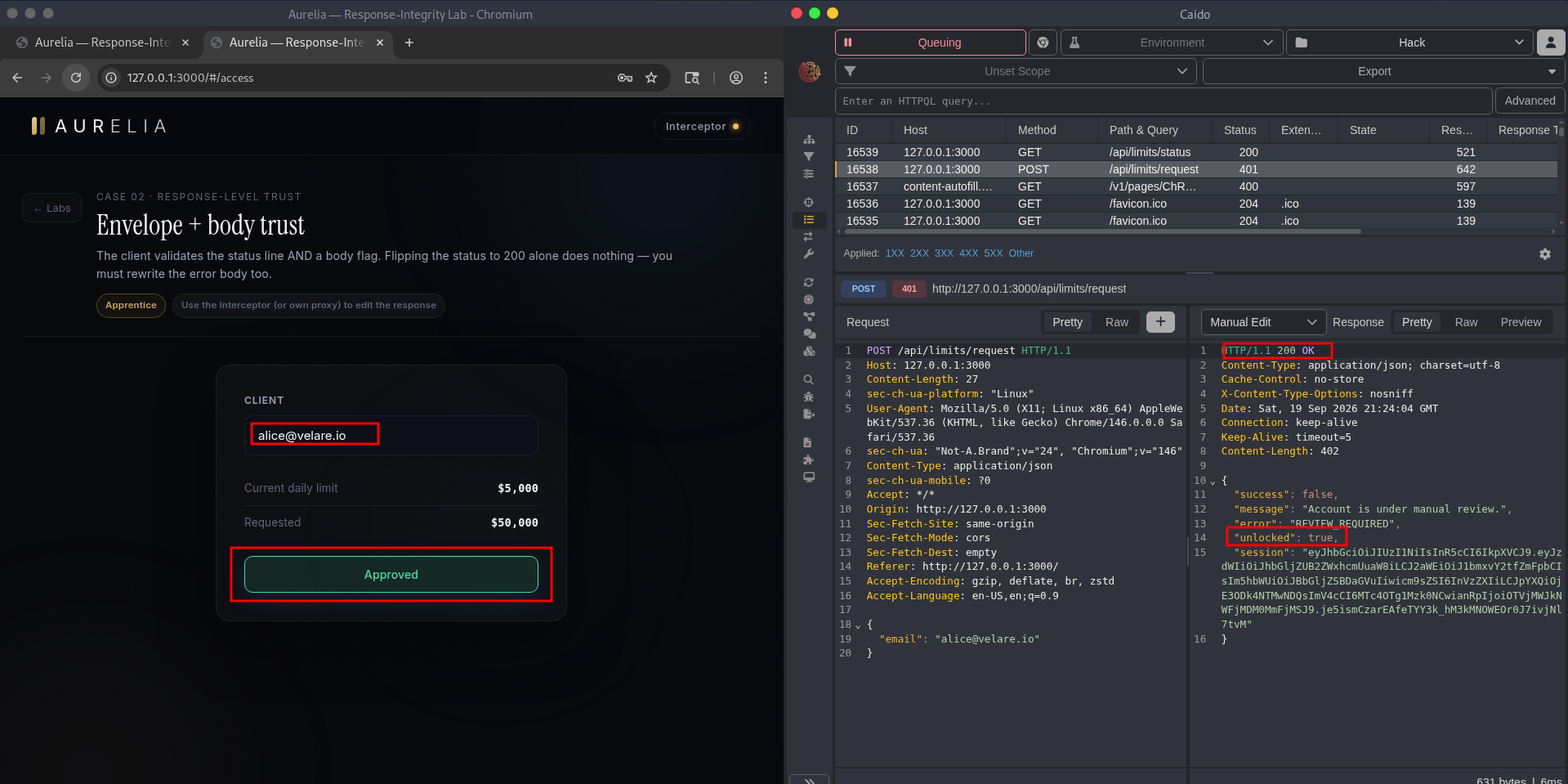
This time I had to edit two things in the proxy:
- status:
401 → 200 - body:
"unlocked": false → true
Once both matched what the client expected, it used the token from that same rejection body and talked to the limits panel as if the review had passed.
Impact
The client did more work than Finding 01, it checked two signals instead of one. But it still believed a response the attacker rewrote. Checking more fields inside the same untrusted envelope doesn’t make you safer. All those fields travel in the same payload the attacker controls. On a real app this flips a denied approval flow into an approved one. It also opens the door to full authentication bypass depending on what the unlocked panel grants access to.
Fix
- Don’t return a grant with a rejection. If the request was denied, the response body should not contain a working session token. Return the error, nothing more.
- Re-check the flag server-side on every request. Don’t let the client remember
unlocked: truefrom a previous response. Query your own database every time the client tries to access the protected resource.
Finding 03: OTP Response Manipulation & Replay
Setting up
Second factor now. Most financial apps use a six-digit OTP as their second factor, you enter your email or phone, the app sends a code, you verify. The lab simulates this flow. Bypassing a second factor defeats the whole point of MFA.
The request and response
I submitted a wrong security code on purpose. The response was 200 with:
1
2
3
4
5
{
  "verified": false,
  "message": "Incorrect security code.",
  "sessionToken": "eyJhbGciOiJIUzI1NiJ9..."
}
The same pattern: verified: false, and a valid sessionToken in the same response.
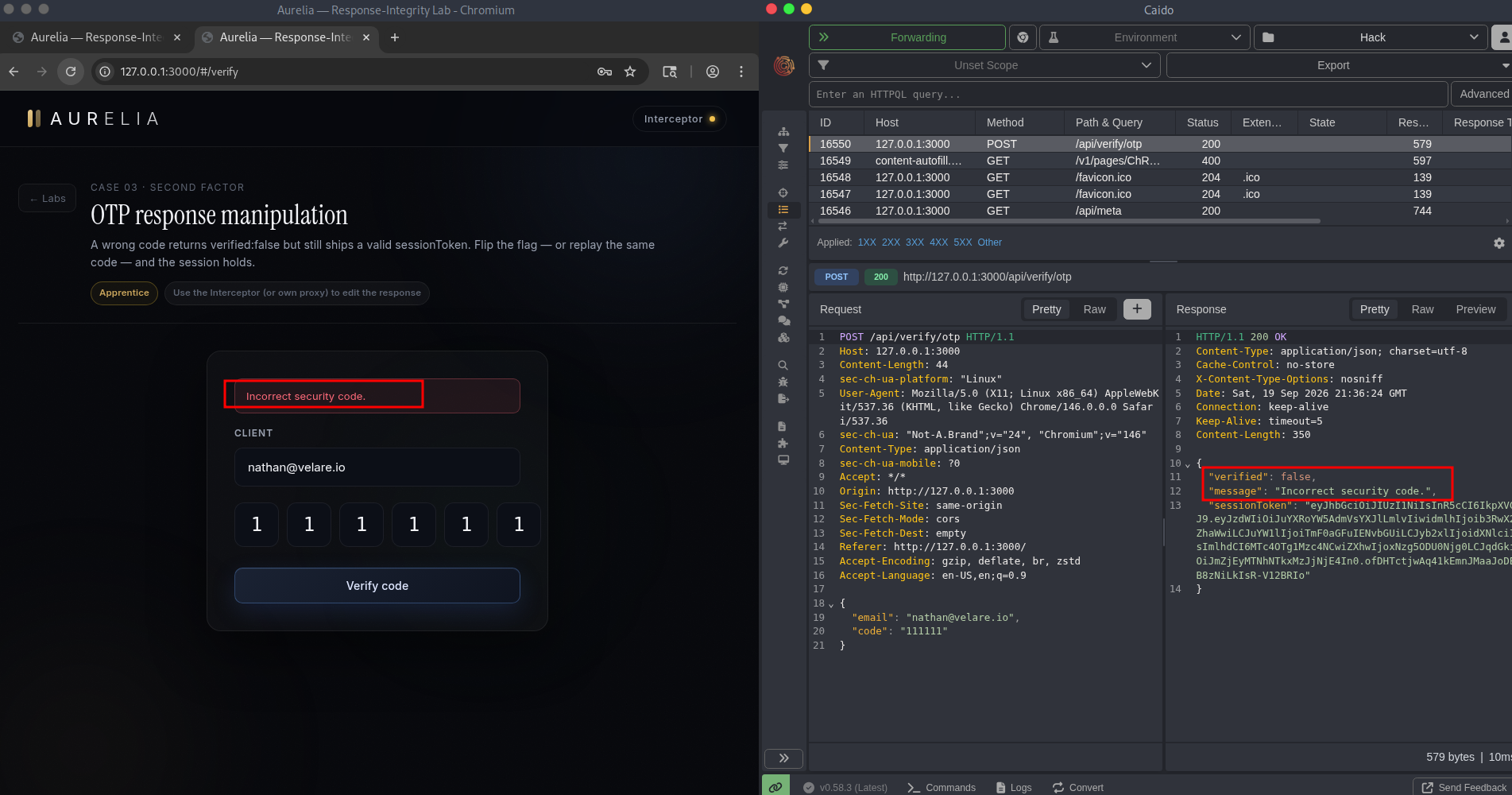
Exploitation: manipulation
I flipped verified: false → true in the proxy and forwarded. The app treated the second factor as passed and continued into the session. The server-side guard was bypassed by editing a response a user was never supposed to control.
Exploitation: replay
I sent the same wrong code again. The server replied verified: false again. But each attempt mints a new sessionToken. A wrong code doesn’t just fail, it issues.
That means:
- Submit any wrong code → get a valid session token.
- Use that token on the next authenticated endpoint.
- It works. The OTP never mattered.
A code that “fails” is effectively a session factory. In an OTP flow that stays valid after a user’s session, MFA doesn’t do what it’s supposed to do.
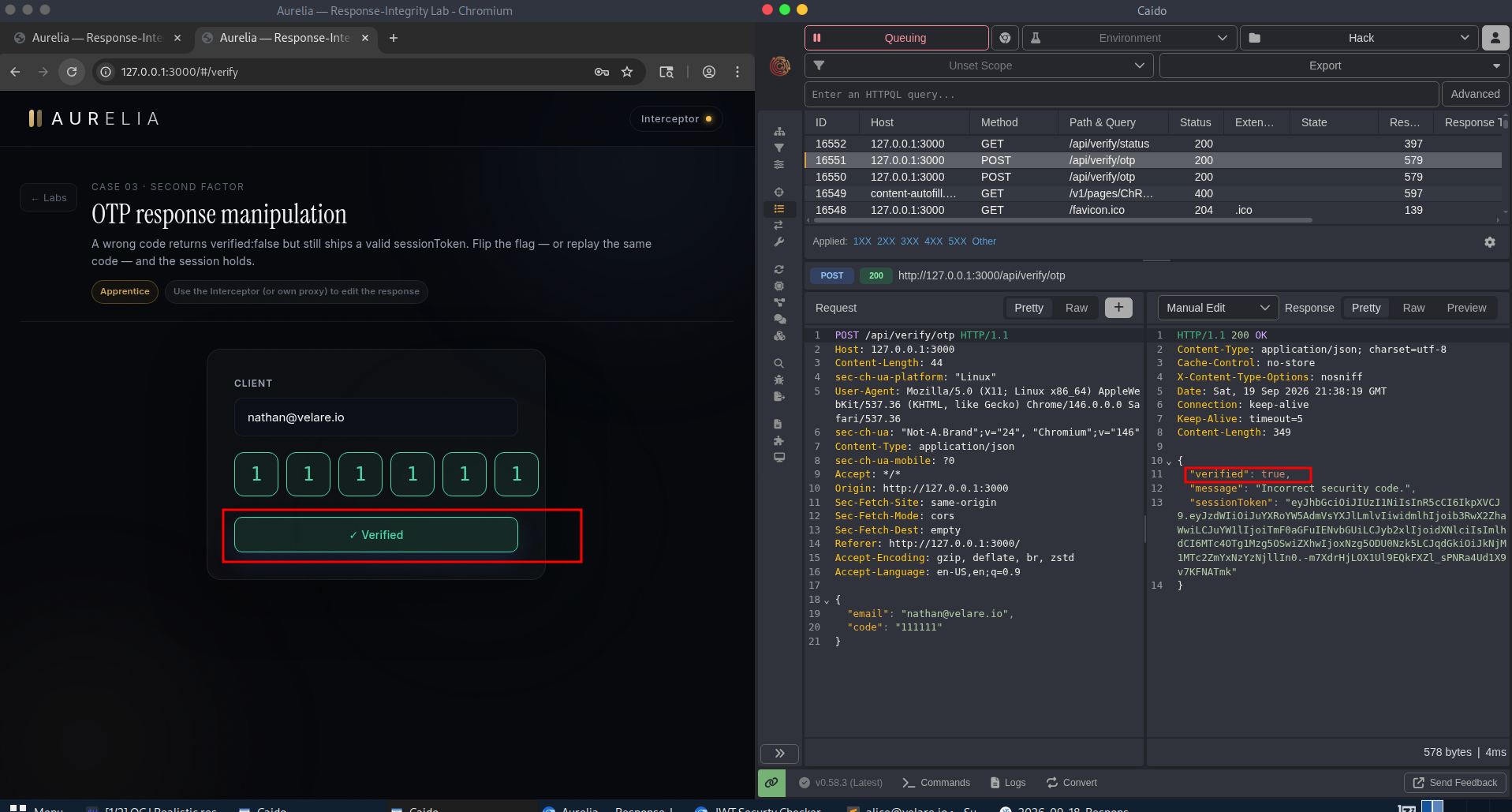
Impact
This is a second-factor bypass. In the real world that means an attacker who has your password and steals a session can nullify the OTP step. MFA is supposed to be the layer that survives a password leak. This kind of bug removes that layer. A leaked credential plus this bug means full account access.
Fix
- Don’t issue a token until the code is correct. The token creation and the OTP validation should happen in the same server-side step. Wrong code = no token, no session, nothing.
- Track OTP attempts per session. Store each code attempt against the session:
{ session_id, code, verified: false, attempt_count: 1 }. When the correct code comes in, flipverified: trueand mint the token. Until then, return nothing usable. - Expire the token after first use. A leaked token that works once is bad. A leaked token that works forever is worse. Make it single-use: verify it on the server, then invalidate it.
Finding 04: Device Binding Bypass
Setting up
Device binding is the “have you logged in from this device before?” check financial apps use to catch new login locations. The same envelope mistake, new context.
The request and response
I authorized with a device id that isn’t mine and was never enrolled. The server replied 200:
1
2
3
4
5
{
  "match": false,
  "message": "Device not recognised.",
  "grant": "eyJhbGciOiJIUzI1NiJ9..."
}
match: false and a grant token in the same body.
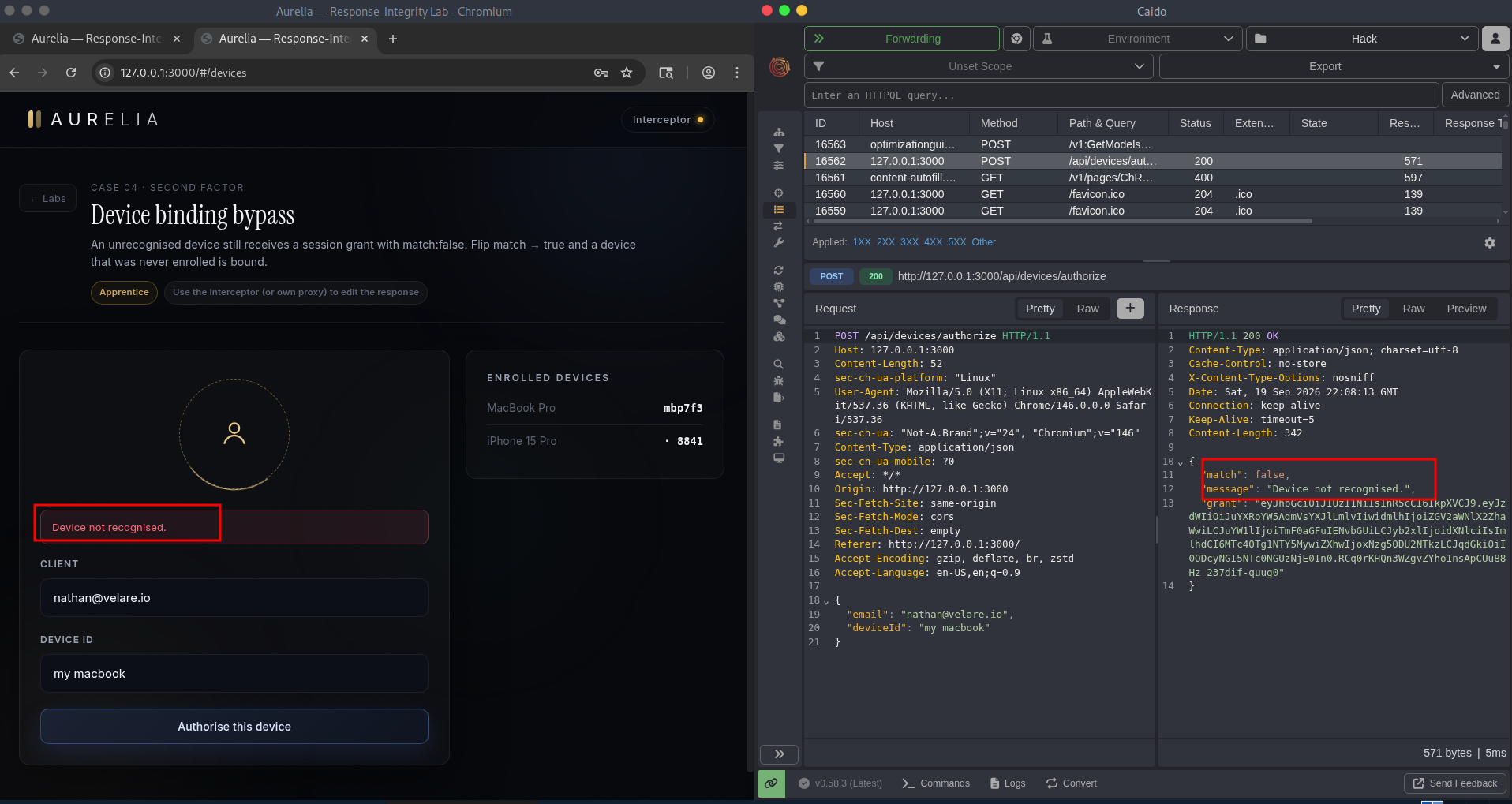
Exploitation
I flipped match: false → true in the proxy. The app considered the device “bound”, activated the session, and let me straight through into the authenticated area.
The grant worked whether I edited the flag or not, I tested it both ways. Editing just changed what the client believed about a device it should have rejected.
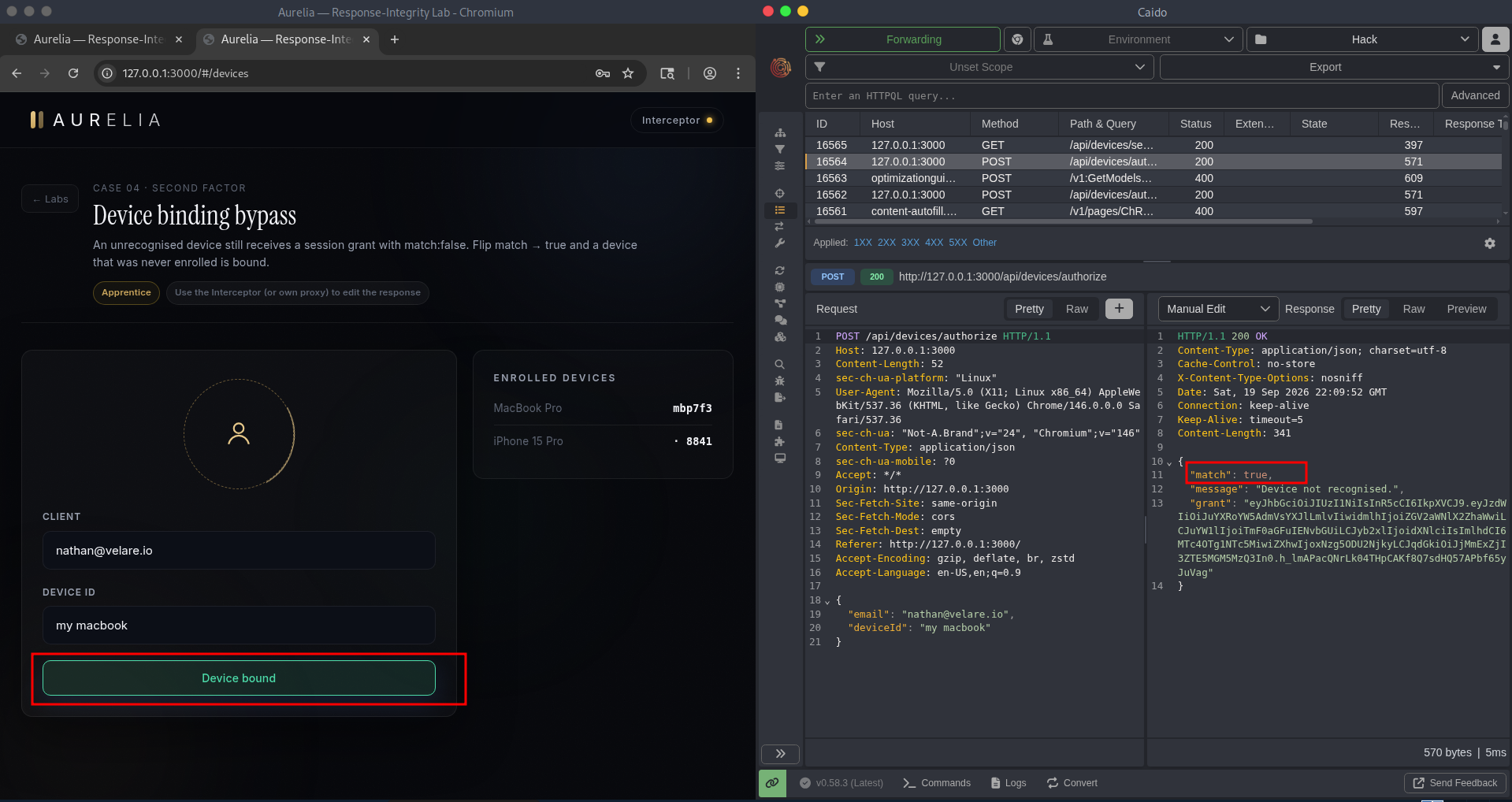
Impact
Device binding is a login-risk control. Breaking it means an attacker logging in from a brand-new device looks like a trusted login. In a real financial app, that’s the difference between a blocked suspicious login and a silent takeover that no “new device detected” alert ever fires.
Fix
- No match, no token. The server should only issue a device grant after it confirms the device is enrolled.
match: falsemeans the response is an error, not a partial success. - Don’t return credentials and verdicts together. If the server says the device is rejected, the response should not also carry a working token. Separate error responses from grant responses entirely.
- Check device enrollment server-side on every request. Don’t let the client carry a
device_bound: trueflag from a previous response. Look up the device ID in your database every time.
Why This Keeps Happening
Same bug, four variations:
| Finding | Rejection said | But still shipped |
|---|---|---|
| 1 · Status flip | 401 denied | a signed session JWT |
| 2 · Envelope + body | unlocked: false | a session token |
| 3 · OTP | verified: false | a sessionToken |
| 4 · Device | match: false | a grant token |
The server built the credential before it checked the condition, then tried to report the condition in the response. The response is the exact field the attacker rewrites. So the check was always going to lose.
How to Hunt for These
If you want to look for this class of bug, here’s the workflow I keep coming back to:
- Sign up or create two accounts so you can test cross-account behaviour safely.
- Proxy everything, never test from a browser alone. Burp, Caido, or ZAP, all the way.
- Look at “failed” responses for tokens. Any error that still contains a session, reset code, grant, or flag is a lead. And not every vulnerable response ships a JWT. Sometimes the server just returns a flag like
isAdmin: falseorverified: falseand the client trusts it. If the server is misconfigured or the developer didn’t think about it, that flag is the whole bug. No token needed. - Edit one thing at a time. Flip the status first, then the body flags. Editing both at once hides which one mattered.
- Replay the same failing input. If the server re-issues fresh tokens on every attempt, that’s a separate finding by itself.
- Test the token after the fail. A leaked token that does nothing is a hygiene issue. A leaked token that works is a bug.
- Score the impact honestly. Every finding here chains to ATO or a broken authentication control. Report what the bug actually gives an attacker.
Wrapping Up
A client trusts the response more than the server that sent it. The server makes the real decision, and a proxy can rewrite the report.
On Aurelia I reproduced this four times in the same session: a failed login that becomes a login, a rejected limit request that becomes approved, an OTP that verifies without a valid code, and a device that binds without a match. Same root cause, four different symptoms. On production apps I’ve chased the same pattern into password resets and account recovery flows, usually ending in the same place: account takeover and broken authentication.
Aurelia is just a way to show the mechanics. The pattern is what matters, and I’ve hit it repeatedly on production apps.
If you’re a researcher, the lab is here. Clone it, run it, look at every rejection body, and try rewriting the verdict.
Fair warning: sometimes you flip a status or a flag, the UI lights up like it worked, and you reach for the report button. Then you reload the page and it’s gone. The app re-fetched from the server, the server said no, and your “bug” was just the client rendering a response it never actually kept. I’ve done this more times than I’d like to admit. Reload before you report.
Happy Hacking ✌🏽